Ultimate-Guide-to-Digital-Invitations : The 2026 Playbook for Turning a Simple Notification into a Must-Attend Experience.
82% of Americans and 78% of Canadians aged 25–45 now prefer digital invites, yet the industry is still stuck in the “static image” era of 2025. This guide is your complete strategy for mastering the interactive, AR-driven, and utility-focused world of Digital Invitations 2026.
Whether you’re a host, event planner, or small business owner, here is how to reclaim that lost engagement and lead the paper-to-pixel shift across the USA and Canada.
Table of Contents
- What Are Digital Invitations in 2026? (And Why They Matter More Than Ever)
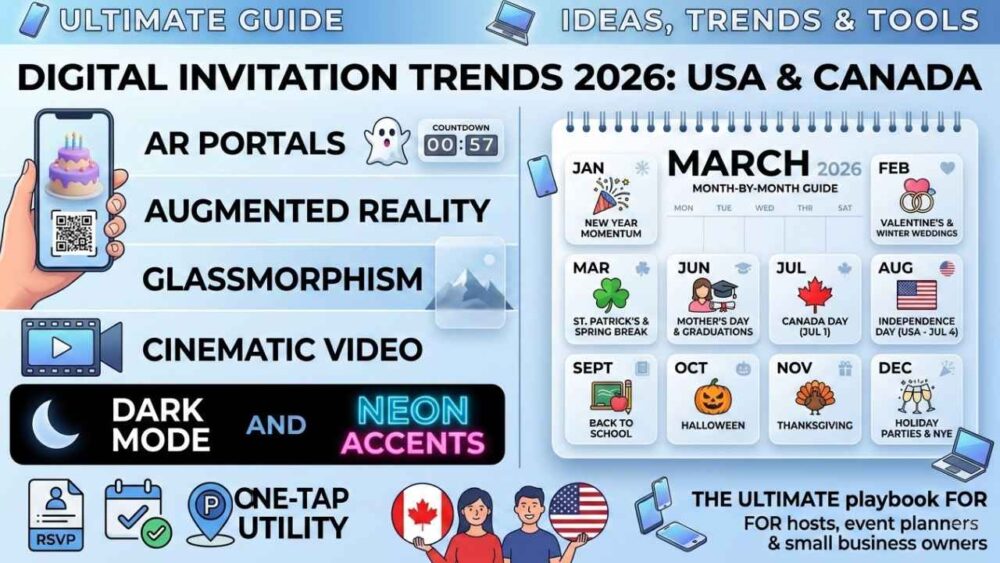
- The Big 6 Digital Invitation Trends Dominating 2026
- Month-by-Month Guide: USA & Canada Occasions (All 12 Months)
- Everyday Occasions: Birthdays, Milestones & Corporate Events
- The 8 Non-Negotiable Rules of a High-Converting Digital Invitation
- Platform & Tool Comparison: Which Service Is Right for You?
- FAQ: Your Top Digital Invitation Questions Answered
- The 2026 Action Checklist: Launch Your Best Invitation Ever
What Are Digital Invitations in 2026? (And Why They Matter More Than Ever)
If you still think a “digital invitation” is a JPEG sent by text, this will upgrade your entire approach.
In 2026, digital invitations are interactive experiences—often web-based—containing:
- Animated graphics
- Live countdown timers
- Embedded RSVP forms
- One-tap calendar integration
- Interactive maps
- And even AR invitations (Augmented Reality)
Done right, your invitation doesn’t just inform guests—it starts the experience.
The Paper-to-Pixel Shift Is Complete
The last hold-outs were ultra-formal hosts and older generations. But 2024–2025 flipped the script:
- Eco-consciousness: Many millennials and Gen Z prefer digital to reduce waste
- Speed & reach: 500 guests in 30 seconds—from Sacramento to Saskatchewan
- Cost savings: Premium digital costs far less than printed stationery
- Real-time intelligence: RSVPs, open tracking, guest list tools
- Hybrid events: Digital is now standard infrastructure
The question isn’t whether to go digital—it’s how well you execute it.
The Big 6 Digital Invitation Trends Dominating 2026
These digital invite trends aren’t hype—they’re the design language your guests already respond to.
Trend 1: Glassmorphism & Frosted Depth
Translucent layers, soft shadows, ambient blur—luxury without loudness. Ideal for:
- Winter events
- Corporate galas
- Minimalist weddings
Trend 2: Augmented Reality (AR) Portals
The headline trend of digital invitations 2026.
Guests scan a QR or open a link to trigger WebAR—no app required. Examples:
- 3D birthday cake appears on a counter
- Halloween ghost appears holding event details
- Wedding rings floating with venue info
AR is shifting from novelty to premium expectation.
Trend 3: Animated Countdown Timers
Static dates feel dead in 2026. Live countdowns create urgency and excitement and are perfect for:
- Ticketed events
- Luxury parties
- Product launches
Trend 4: Cinematic Micro-Videos (Under 15 Seconds)
Short mood-setters (8–15 sec) inspired by Reels/TikTok. Works for:
- BBQs
- birthdays
- weddings
- business invites
A static JPEG won’t compete.
Trend 5: Dark Mode & Neon Accent Design
OLED screens made dark invitations look premium. Best for:
- Night events
- NYE
- Halloween
- corporate celebrations
Trend 6: One-Tap Utility Features
The best online invitation ideas blend design + convenience:
- One-tap RSVP
- Add to Google/Apple Calendar
- Maps with parking included
- Weather widget for outdoor events
Guests remember what was easy.
Month-by-Month Guide: USA & Canada Occasions (All 12 Months)
Every month has a different emotional “frequency.” Great invitation design mirrors that.
PHASE 1: Q1 — The Fresh Start (January–March)
January — New Year Momentum
Design direction: clean slate, glassmorphism, white/silver palette
Best use cases: business kickoff, brunch invites, “Year Ahead” client cards
Pro move: a mini landing page with a 10–15 sec animated goal preview
Technical tip: load under 2 seconds (January is peak email open month)
February — Valentine’s Day, Galentine’s & Winter Wedding Season
- Valentine’s events: AR rose bouquet + link to reservations
- Wedding save-the-dates: animated love story timeline
- Galentine’s brunch: fun colors + RSVP that collects menu choices
Palette: reds, dusty rose, champagne gold
March — St. Patrick’s, Spring Break & Easter Preview
- St. Patrick’s pub crawls: route map + beer pour animation
- Spring Break: destination weather widget + packing list link
- Easter: pastel design + potluck form (“What are you bringing?”)
- Passover: heritage-inspired motifs + warm copper tones
PHASE 2: Q2 — Connection Season (April–June)
April & May — Mother’s Day, Graduations, Cinco de Mayo & Memorial Day
Mother’s Day (highest emotional ROI):
Digital Gift Box format → tap to “open” → photo montage + music + optional AR message
Graduations:
Cap & Gown countdown + journey gallery + navy/gold palette
Cinco de Mayo:
Bold saturated colors + vendor map + schedule
Memorial Day BBQs:
Americana look + weather widget + potluck board
June — Father’s Day, Pride Month & Wedding Season Peak
- Father’s Day: clean “technical chic” design + utility-first
- Pride Month: bold gradients + inclusive copy + multi-step RSVP
- Weddings: invitation as mini website: venue story, stays, dress code, registry, RSVP
PHASE 3: Q3 — Summer & Cultural Celebrations (July–September)
July 1 — Canada Day
- Maple leaf animations + red/white palette
- Include park maps, best viewing points, transit, parking
- Business idea: client thank-you digital card + tasteful AR
July 4 — Independence Day (USA)
Best format: fireworks reveal on dark background
Premium effect: “sparkler writes your name” personalization
Must-haves: weather widget, parking note, what-to-bring list, headcount tracker
August — Back to School & Late Summer Parties
- School events: clean design + form collecting kid name/grade
- End-of-summer: “last summer memories” gallery wall to boost RSVPs
September — Labor Day + Fall + Rosh Hashanah / Yom Kippur
- Labor Day: warm amber tones + playlist link
- Rosh Hashanah/Yom Kippur: respectful elegant design, rich palettes, menu reveal, dietary field
PHASE 4: Q4 — The Grand Finale (October–December)
October — Halloween + Canadian Thanksgiving
Halloween: biggest creativity month
- Adult parties: neon/dark + AR “interruptions”
- Kids: friendly AR characters
- Haunted events: slow suspense reveals + ambient audio
Canadian Thanksgiving: harvest palette + leaf animations + menu reveal + dietary field
November — US Thanksgiving, Veterans Day & Friendsgiving
Friendsgiving: potluck board embedded = non-negotiable
Thanksgiving: heritage photo wall + warm amber/burgundy
Veterans/Remembrance: solemn, clean design, navy/white + respectful tone
December — Holiday Parties, Christmas, Hanukkah, Kwanzaa & NYE
To stand out in December: personalization + quality
- Office parties: winter theme (inclusive), midnight navy/silver/gold
- Christmas: photo that “comes alive” + gift-reveal animation
- Hanukkah: candlelight animation + “Which night?” RSVP selector
- Kwanzaa: culturally specific design, red/black/green, kinara animation
- NYE: dynamic live countdown + champagne pour RSVP confirmation
Everyday Occasions: Birthdays, Milestones & Corporate Events
Kids’ Birthday Parties
Two audiences: kids + parents.
- AR character invasion (dino/unicorn/astronaut announces details)
- RSVP form must include allergy/diet notes
- Map link + parking + gift registry link
- Add a Dress Code Hint as a visual element
Adult Milestone Birthdays (30/40/50/60+)
- Decade Recap animated timeline (life highlights → party details)
- Community photo montage via Google Form submissions
Anniversaries & Vow Renewals
25-Year Newspaper Flip: opens as a newspaper from the wedding year → transforms into 2026 → video message reveal.
Corporate Events, Launches & Client Appreciation
- Product launch: teaser + countdown + timed “reveal” button
- Client appreciation: personal video from CEO/AM
- Annual parties: use year metrics and wins inside invitation design
The 8 Non-Negotiable Rules of a High-Converting Digital Invitation
Rule 1: Send a Link, Never a File
No heavy attachments. Links load faster and can be updated.
Rule 2: Mobile-First, Always
85%+ opens are mobile. Design for portrait first.
Rule 3: Audio Is 50% of the Experience
Even a subtle 10–15 sec loop sets the vibe.
Rule 4: Always Include a “What Next” Action
Clear CTA: RSVP, calendar add, directions, share.
Rule 5: Personalize at Scale
Use merge fields (e.g., “Hey Sarah…”) for higher RSVPs.
Rule 6: Test on iPhone + Android Before Sending
Safari and Chrome behave differently—verify everything.
Rule 7: Respect Privacy
No surprise marketing. CASL in Canada requires consent.
Rule 8: Follow Up With Three Touches
- Initial send
- Reminder 7–10 days before (non-RSVPs only)
- Final logistics 24–48 hours before
Platform & Tool Comparison: Which Service Is Right for You?
Web-based AR Platforms
Best for premium weddings and corporate invites. Higher cost per send.
Template Tools (Canva, Evite, Greenvelope)
Fast, easy, affordable—less personalization depth.
Email Tools (Mailchimp, Klaviyo)
Great analytics + automation—less “invitation” feel.
Video Message Tools (Loom, Vimeo)
Authentic and personal—no built-in RSVP.
Social Event Tools (Partiful, Paperless Post, Hobnob)
Great for casual parties—limited creative control, app/account dependency.
Quick Decision Framework
Ask:
- Guest count (under 50 vs 200+)
- Occasion prestige
- Need AR/video or not
FAQ: Your Top Digital Invitation Questions Answered
What is the best format for a digital invitation in 2026?
A hosted web link (not a file). It supports RSVP, updates, analytics, and works everywhere.
How far in advance should I send a digital invitation?
Formal: save-the-date 6–8 weeks, invite 3–4 weeks out. Casual: 2–3 weeks.
Are digital invitations appropriate for weddings?
Yes—premium digital can exceed printed stationery and is easier for guests.
What are AR invitations, and how do they work?
WebAR overlays 3D elements through the phone camera—no app required.
How do I ensure it looks good on iPhone and Android?
Test on both devices. Use HTML5/CSS3 standards and portrait formats.
Can digital invitations be used for kids’ parties?
Yes—AR character invites are top-performing in 2026.
What should every digital invitation include?
Event name, date/time, location + map, RSVP with deadline, host contact, dress/bring notes. Add countdown/audio for premium.
The 2026 Action Checklist: Launch Your Best Invitation Ever
Design & Content
- Event details confirmed before sending
- Mobile-first tested on iPhone + Android
- Aesthetic matches event tone
- Typography readable without zoom
- Consistent palette
- Audio tested
- Personalization enabled (if possible)
Functionality
- RSVP works and delivers responses instantly
- Calendar add works (Google + Apple)
- Map links open correctly
- All external links tested
- Loads under 3 seconds on LTE
- No file attachments—link only
Distribution
- Formal: 6–8 weeks out; casual: 2–3 weeks
- Reminder automation set for non-RSVPs
- Final logistics message ready
- Guest segments set (if needed)
- RSVP deadline 72 hours before event
The Final Word: Your Screen Is Now a Stage
In 2026, your invitation isn’t a logistical detail—it’s the opening act.
Each month has its own story, palette, and emotion. The hosts who match the right design to the right moment are the ones whose events get fully attended, remembered, and talked about long after.
The tools are ready. The tech is mature. The only variable left is how intentionally you use it.
Your screen is a stage. In 2026, every invitation you send is opening night.