How to send a video invitation on WhatsApp is exactly what this guide solves, especially after you have put real effort into your event invitation. The video looks beautiful. The music is perfect. The design communicates exactly the right energy. And then you send it on WhatsApp — and it arrives pixelated, compressed beyond recognition, stripped of its audio, or worse, it simply fails to load.
That frustrating gap between what you created and what your guest receives is the most common mistake people make when sending video invitations on WhatsApp. And the fix is not complicated. You just need to understand how WhatsApp actually handles video, and then work with it rather than against it.
This guide walks you through everything — file formats, compression, the right sending method, how to structure your message for maximum impact, and how to go beyond the standard video file when the occasion genuinely calls for something more.
Why WhatsApp Compresses Your Video (And What That Costs You)
WhatsApp is an instant messaging app, not a video hosting platform. By default, it automatically compresses every video you send in order to reduce data usage for both sender and recipient. For a casual clip, that compression is barely noticeable. For a carefully designed event invitation with fine typography, smooth motion graphics, and a mixed audio track, it can be devastating.
What compression does to your invitation video:
Visual quality drops significantly. Fine text, subtle gradients, and crisp motion effects all blur. A video that looked immaculate at 1080p can resemble a video call screengrab after WhatsApp’s default compression kicks in.
Audio quality degrades. That perfectly chosen background track that sets the event’s emotional tone? WhatsApp’s compression reduces audio bitrate, and the result often sounds thin and flat.
File size still counts. Even after compression, a video above 16MB used to hit WhatsApp’s limit. The current limit has expanded, but heavy files still struggle on slow mobile connections — and a significant portion of your guest list is likely opening your message on LTE, not Wi-Fi.
The good news: there are two reliable methods to send a video invitation on WhatsApp with quality fully intact, and both are easy.
Method 1: Send as a Document (The Simplest Quality Fix)
This is the most underused trick in digital invitation sending, and it works immediately.
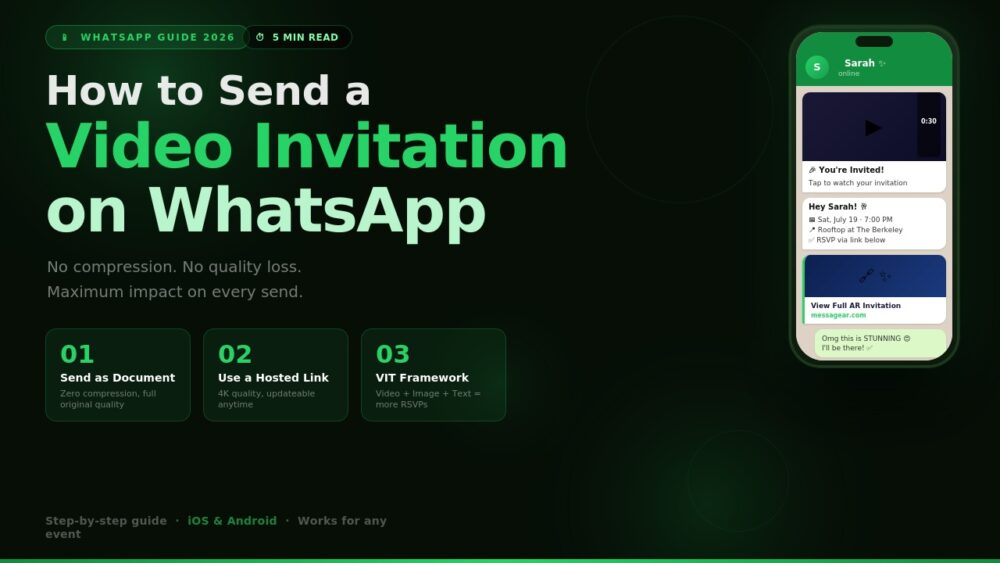
When you send a video through WhatsApp as a standard media file, WhatsApp compresses it automatically. When you send the exact same video as a document, WhatsApp sends it without any compression whatsoever. The recipient receives the file at full original quality.
Here is how to do it:
On iPhone:
- Open the WhatsApp conversation
- Tap the attachment icon (paperclip or “+” depending on your version)
- Select Document instead of Photo/Video
- Browse to your video file and select it
- The recipient receives it at full quality, labeled as a file download
On Android:
- Open the WhatsApp conversation
- Tap the attachment icon
- Choose Document
- Navigate to the video file and select it
- Send as normal
The recipient will see a document download prompt rather than an inline video player. They tap it once, it opens in their phone’s native video app, and they watch it at full quality. One extra tap is a completely acceptable trade-off for the quality difference.
When to use this method: For direct individual sends to close contacts — family members, a wedding party, VIP guests — where you want the highest quality possible and you are confident the recipient will know to tap and open a file.
Method 2: Send a Link (The Professional Standard)
For any event where you are inviting more than a handful of people, or where the impression your invitation makes genuinely matters, sending a hosted link is the right approach — full stop.
Here is why it is categorically better than attaching a file:
Zero compression, guaranteed. The video lives on a server and streams at full resolution directly to the recipient’s browser. WhatsApp never touches it.
Instant loading. Guests do not download anything to their phone. No storage used, no data caps hit, no waiting for a large file to transfer.
Updateable after sending. If your venue changes, your time shifts, or you need to add a parking note — update the hosted invitation and every single link you already sent now shows the corrected information. A file you sent cannot be recalled.
Trackable. Most professional invitation platforms show you who opened the link, when, and how many times. That is intelligence that a WhatsApp video file simply cannot provide.
How to do it: Create your video invitation through a web-based invitation platform, which hosts the video for you and gives you a shareable link. Copy that link and paste it into WhatsApp as a text message. WhatsApp will generate a link preview automatically — a thumbnail and title — so it looks polished in the chat rather than like a bare URL.
The VIT Framework: How to Structure Your WhatsApp Invitation Message
Whether you are sending a video file or a hosted link, the structure of the full WhatsApp message around it matters enormously. The Video-Image-Text (VIT) framework is the approach used by event professionals who get high RSVP rates consistently.
V — Video First Lead with the video or the link. This is your emotional hook. It sets the tone, creates anticipation, and does the heavy lifting before the guest reads a single word. Keep the video itself between 20 and 45 seconds for most occasions. Long enough to communicate the vibe; short enough to be watched to the end.
I — Image Second Immediately after the video, send a high-resolution JPEG or PNG of the key details — names, date, time, venue. Think of this as the digital equivalent of a physical invitation card. Guests screenshot and save this image. It becomes their reference point for the event. To preserve image quality on WhatsApp, send it as a document too, or use the HD media option that WhatsApp has made available in recent versions.
T — Text Third The text below the media is where practical logistics live. Keep it clean and scannable:
📅 Saturday, July 19 | 7:00 PM
📍 Rooftop at The Berkeley | 42 West 4th Ave
✅ RSVP: [link]
📍 Directions: [Google Maps link]
No walls of text. No paragraph-form event descriptions. Just the five facts your guest needs to say yes and show up correctly.
Format and Technical Specifications That Matter
If you are creating the video yourself rather than using a platform, these specifications will ensure it looks as good on WhatsApp as it did in your editing software:
Aspect ratio: 9:16 vertical (portrait orientation). This fills the phone screen when played and looks intentional rather than accidentally filmed sideways. Horizontal videos play in a small box with black bars and feel like an afterthought on mobile.
Resolution: 1080 x 1920 pixels. This is the industry standard for mobile-first video invitations. It delivers sharp quality without creating unnecessarily large files. 1080 x 1920 is the ideal vertical format for most mobile-first invitation workflows — it delivers sharp quality without creating unnecessarily heavy files. MessageAR
Length: 20 to 45 seconds for casual events. Up to 60 seconds for weddings, corporate events, or milestone occasions where the emotional story justifies the length.
Frame rate: 24fps for a cinematic, polished feel. 30fps if you want a cleaner, more energetic look.
File format: MP4 is universally compatible and the safest choice for WhatsApp delivery. MOV files can sometimes cause playback issues on Android.
File size: Keep it under 30MB for the smoothest delivery experience, even when sending as a document. If your video is larger, consider trimming or adjusting export settings.
Audio: Include it, always. Background music is not decoration — it is 50% of the emotional impact of a video invitation. A silent video invitation feels incomplete. Choose something that matches the event’s energy and set the volume at a level that enhances rather than overpowers.
WhatsApp Etiquette for Video Invitations
Knowing how to send it correctly is half the job. Knowing when and how to behave around the send is the other half.
Send at the right time. Mid-morning (10–11am) and early evening (6–7pm) produce the highest open rates for WhatsApp messages. Avoid late night sends — they generate annoyed read receipts, not excited RSVPs.
One send, one follow-up. Send the full invitation once. Follow up with a single reminder message seven to ten days before the event for guests who have not responded. Two messages total is the socially acceptable limit before it feels like pressure.
Personalize where possible. “Hey Sarah, we’d love to see you there!” performs measurably better than a mass group forward. For larger guest lists, even a first-name drop in the accompanying text makes the recipient feel individually considered rather than bulk-messaged.
Do not forward from a group. Receiving an invitation via a group forward — where your name appears alongside 47 others — communicates that the host did not think about you specifically. For any event that matters, send to individuals or use a broadcast list (which delivers each message privately, even to multiple recipients simultaneously).
Test before sending. Send the video to yourself first. Check that the quality held, the audio plays correctly, and any link in the message text is active. One broken send to 200 guests is a bad look and cannot be unsent.
When the Occasion Calls for More Than a Video File
For most casual events — a birthday gathering, a summer barbecue, a house move — a well-produced vertical video sent as a document, or via a hosted link using the VIT framework, is entirely sufficient and looks great.
But for occasions with higher emotional or professional stakes — a wedding, a milestone anniversary, a major corporate event, a client appreciation send — there is a format that goes noticeably further than a video file shared on WhatsApp can deliver.
For hosts who want to combine digital convenience with a stronger wow factor, augmented reality can create a more memorable experience. By using tools like MessageAR, you can turn a static digital card into an interactive moment where a video message appears in the guest’s own personal space — a memorable way to make the invitation feel more personal and distinctive. MessageAR
MessageAR (messagear.com) lets you send personalized AR video greetings that appear right in front of the recipient MessageAR — the guest taps a link in WhatsApp, their phone camera activates, and a video appears to be playing in their actual room. No app download required. It works through the mobile browser directly. The link is shared exactly like any other WhatsApp message — but the experience on the receiving end is something guests consistently describe as the most memorable invitation they have ever received.
It is worth knowing about, particularly if you have an event where the first impression genuinely matters.
Common Mistakes to Avoid
Sending the file as a standard media attachment. As covered above — do this and WhatsApp will compress your video. Always send as a document or use a hosted link.
Using horizontal (landscape) video. Portrait fills the phone screen. Landscape plays in a small horizontal strip with black bars above and below. It looks like an accident.
No text message with the video. The video creates emotion; the text delivers logistics. Both are necessary. Never send a video alone with no supporting text — guests will feel the event vibe but have no idea what time to show up.
Sending in a group chat. A group message with 60 recipients is not an invitation — it is a broadcast. It signals low effort. Use WhatsApp’s Broadcast List feature to send individually at scale.
No RSVP mechanism. Every invitation needs a clear answer to “What do I do now?” If there is no RSVP link, call to action, or confirmation request, guests will watch the video, think “nice,” and forget to confirm. An RSVP link in the text portion of your message closes that gap.
Forgetting the time zone. If any guest is in a different city or country, always include the time zone. “7:00 PM EST” takes two seconds to add and prevents a genuine source of day-of confusion.
A Quick-Reference Checklist Before You Hit Send
- Video is in 9:16 portrait format, 1080 x 1920 resolution
- Length is between 20 and 60 seconds
- File is MP4 format
- Sent as a Document (for file sharing) or as a hosted link
- Audio is present and at an appropriate volume
- A high-res image of the key details follows the video
- Text message below contains: date, time, venue, RSVP link, map link
- Tested on your own phone before any distribution
- Sending to individuals or a Broadcast List (never a group chat)
- Send time is between 10am–11am or 6pm–7pm
The Bottom Line
WhatsApp is the most universally used messaging platform on the planet, and that makes it genuinely powerful for event invitations when you use it correctly. The platform’s default behavior — compressing video, stripping quality — works against you only if you do not know the workarounds. Now you do.
Send as a document for direct quality sends. Use a hosted link for anything at scale or with professional stakes. Follow the VIT framework to structure every WhatsApp invitation message. And when the occasion truly calls for something that goes beyond a video file, know that the tools exist to deliver it.
Your invitation is not just information. It is the first moment of your event. Send it like it matters.